


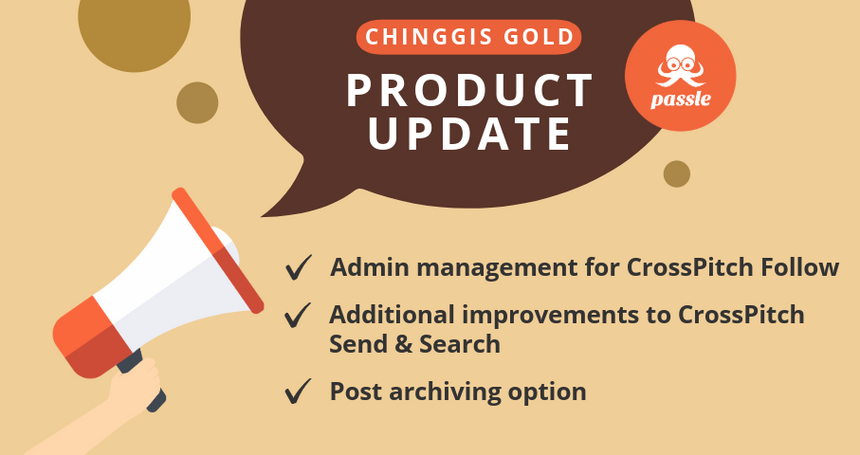



Our latest sprint is named after Chinggis Gold, the Mongolian Vodka. In this release, we're introducing a new administrator interface for managing CrossPitch Follows, email links to connect with colleagues for CrossPitch Search, notifications and the CrossSelling Intelligence Map, and a range of enhancements across the platform.
Here is an overview of our new features and enhancements
CrossPitch Follow: Admin management of CrossPitch Follows
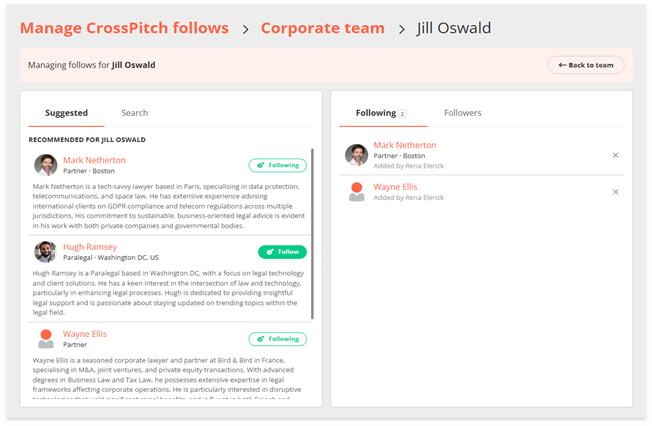
A new dedicated area allows administrators to manage CrossPitch Follows across the firm, designed for firms who want to give their Business Development team greater control over how connections are managed at scale. This new feature allows Business Development users to manage CrossPitch Follows on behalf of their users - and will be particularly useful for onboarding new lateral hires and setting up a ready-made network.
The new Manage CrossPitch Follows interface provides full visibility and control over 'Follow' teams and individual connections, all from a single location. BD users can create teams of managed users, select from relevance-matched suggestions, search for relevant connections using CrossPitch Search, and follow/unfollow on their behalf.
User detail screen showing management options (suggested recommendations and option to search) and overview of Following and Followers details
To find out more about Manage CrossPitch Follow, contact your Client Success team and they will be happy to discuss.
CrossPitch: Email link
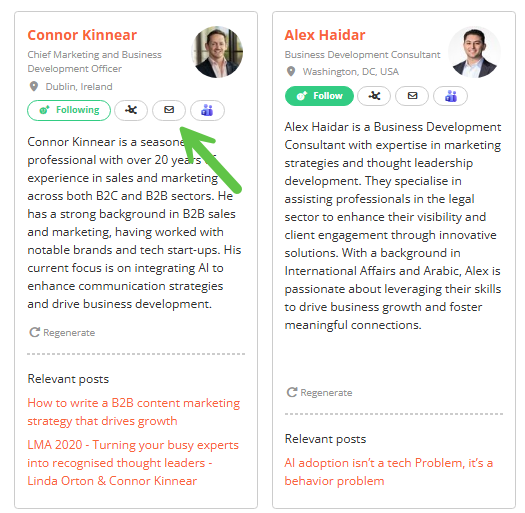
Users can now reach out using a direct email link alongside colleague profiles from CrossPitch Search results and from user details on the Cross-Selling Intelligence Map. The email link will also appear in relevant CrossPitch notifications. Contact is just one click away — no need to navigate elsewhere to find an email address.
CrossPitch Search user profiles showing email link for easy connection with colleagues
Post archiving
Administrators can now archive posts rather than deleting them permanently. Archived posts are removed from the live site but kept in the system, giving teams a safer and more recoverable way to manage older or out-of-date content.
A full audit trail is recorded in the post history, showing who archived or restored a post and when. When a post is restored, it returns as a draft rather than going straight back to live, meaning it can be reviewed and approved before republishing.
Other key changes in this update, including enhancements or minor tweaks to our existing features
CrossPitch Send
- Senders can now add a personalised message below the post summary in CrossPitch notification emails, providing more context for recipients.
- CrossPitch Send is now available for reposted content, not just original posts. (Note: This applies to cross-client reposts only.)
CrossPitch Search
- CrossPitch Search can now be configured to show results by seniority, ensuring that the most relevant and senior professionals surface at the top of search results.
CrossPitch Profiles
- Education and Hobbies fields have been added to CrossPitch profiles, making it easier to find common ground and build personal connections.
Approvals: Two-step approval process
- Clients can now enforce a mandatory two-step approval process, adding an extra layer of governance before posts are published.
Newsletter: ISTATOY share link
- An ISTATOY ('I Saw This And Thought Of You') share link option has been added to newsletter emails, making it easy for readers to share individual articles with a colleague.
If you would like to know more, including a full list of updates in this release, read our Release Notes: 27 May 2026 - 3.16 (Chinggis Gold).
We value your feedback — it helps guide our future updates and ensures Passle keeps meeting your needs. Please feel free to share any ideas or suggestions with the Product Team.
/Passle/53d0c8edb00e7e0540c9b34b/MediaLibrary/Images/2026-10-14-09-22-13-024-6acf49c5944aac193a981bb9.jpg)
/Passle/53d0c8edb00e7e0540c9b34b/MediaLibrary/Images/2026-11-04-17-10-44-050-6aeb6714ba0bff4af3658ce7.jpg)
/Passle/53d0c8edb00e7e0540c9b34b/MediaLibrary/Images/2026-11-03-15-11-15-803-6ae9f9939223331c13f47fc7.png)
/Passle/53d0c8edb00e7e0540c9b34b/MediaLibrary/Images/2026-10-27-11-04-12-699-6ae0852c821c27f27de73832.png)
/Passle/53d0c8edb00e7e0540c9b34b/MediaLibrary/Images/2026-10-26-12-33-21-580-6adf489140768d6fb37c66a6.jpg)