






Our latest mobile app release is named after ‘TON 618’, one of the largest black holes ever discovered. In this release, we're bringing CrossPitch to the Passle app, so you can search for colleagues and keep up with relevant content wherever you are.
If you want to learn more about the updates or have any questions, please feel free to contact the Passle Client Success Team.
Here is an overview of our new features and enhancements
CrossPitch Search
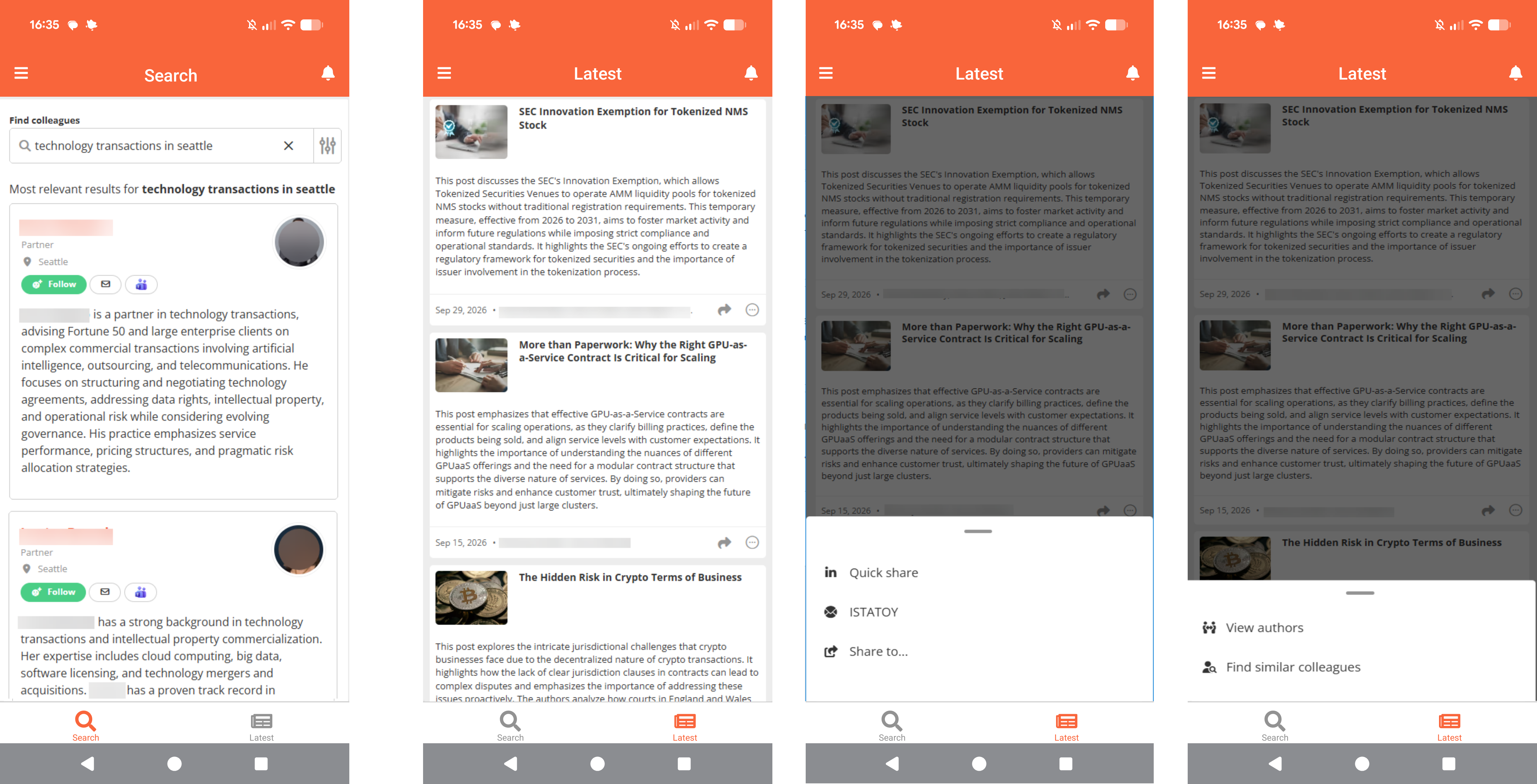
CrossPitch users can now use CrossPitch People Search in the app. Users can search for colleagues, view their bios, and connect with them to expand their network.
To find out more, read our article What is CrossPitch Search?
CrossPitch 'Latest'
CrossPitch users can now access a personalised feed of relevant posts in the app. The feed is shown in date order and includes posts from colleagues they follow, as well as posts matched by relevance through CrossPitch.
Users can read posts in full, connect with authors to build their network, and share posts by email, LinkedIn or other mobile sharing options.
Other key changes in this update, including enhancements or minor tweaks to our existing features
Improved navigation
We've improved navigation in the app for all user types:
- Users can now open their profile settings from the user card on the Settings page, so they can edit their user settings and CrossPitch settings in the app.
- A floating 'Create/Edit post' icon is now available on all relevant Thought Leadership Suite pages. This replaces the 'Create' tab on the bottom navigation bar.
- The 'Activity notifications' tab has moved from the bottom navigation bar to the top right of the top navigation bar.
How to update or download the Passle app
To update or download the Passle app, visit the App Store on iOS or Google Play Store on Android. If you’re updating, simply search for Passle and select 'Update.' For new downloads, search for Passle, then tap 'Install' or 'Get' to install it on your device.
If you would like to know more, including a full list of fixes and minor updates in this release, read our Release Notes: 1 October 2026 - 4.4.0 (TON 618).
We value your feedback. It helps guide our future updates and ensures Passle keeps meeting your needs. Please feel free to share any ideas or suggestions for new features or improvements with the Product Team.
/Passle/53d0c8edb00e7e0540c9b34b/MediaLibrary/Images/2026-10-14-09-22-13-024-6acf49c5944aac193a981bb9.jpg)
/Passle/53d0c8edb00e7e0540c9b34b/MediaLibrary/Images/2026-10-27-11-04-12-699-6ae0852c821c27f27de73832.png)
/Passle/53d0c8edb00e7e0540c9b34b/MediaLibrary/Images/2026-10-26-12-33-21-580-6adf489140768d6fb37c66a6.jpg)
/Passle/53d0c8edb00e7e0540c9b34b/MediaLibrary/Images/2026-10-22-11-14-29-774-6ad9f015ed262a90b1bf36f6.jpg)
/Passle/53d0c8edb00e7e0540c9b34b/MediaLibrary/Images/2026-10-19-13-24-47-415-6ad61a1fdc6374f637024697.jpg)